
ASOS AI Stylist Feature

ASOS AI Stylist Feature

Adding an AI-driven personalized stylist feature to ASOS e-commerce

Duration

Apr 2024 (3wks)

Tools

Figma, FigJam

Role

UI/UX designer

Methods

Moderated interview,
Moderated usability testing

Moderated interview,
Moderated usability testing

Background

ASOS, an online-only fast fashion retailer, reported a $316m pre-tax loss in 2022, driven by a ~50% return rate. The brand faced a critical need to improve purchase confidence.

Background

ASOS, an online-only fast fashion retailer, reported a $316m pre-tax loss in 2022, driven by a ~50% return rate. The brand faced a critical need to improve purchase confidence.

Background

ASOS, an online-only fast fashion retailer, reported a $316m pre-tax loss in 2022, driven by a ~50% return rate. The brand faced a critical need to improve purchase confidence.

Problem

Shoppers struggle to decide what to buy and to gauge fit, style, and color without in-person try-ons.

Problem

Shoppers struggle to decide what to buy and to gauge fit, style, and color without in-person try-ons.

Problem

Shoppers struggle to decide what to buy and to gauge fit, style, and color without in-person try-ons.

Solution Highlights

The ASOS AI Stylist feature helps shoppers visualize how outfits fit on them and receive outfit recommendations without trying them on in person:

  • Personalized avatars & virtual try-on

  • Virtual fitting experience

  • AI outfit recommendations

Impact/Result

Intent to use

5/5 users were excited about the AI stylist feature and believed it would help them make better clothing decisions

Intent to use

5/5 users were excited about the AI stylist feature and believed it would help them make better clothing decisions

Intent to use

5/5 users were excited about the AI stylist feature and believed it would help them make better clothing decisions

Onboarding Satisfaction

Satisfaction with the AI stylist onboarding increased by 32% after adding flexibility and balancing intent-driven and guided inputs

Onboarding Satisfaction

Satisfaction with the AI stylist onboarding increased by 32% after adding flexibility and balancing intent-driven and guided inputs

Onboarding Satisfaction

Satisfaction with the AI stylist onboarding increased by 32% after adding flexibility and balancing intent-driven and guided inputs

How might we help shoppers visualize outfit fit and styling suggestions without try-on?

How might we help shoppers visualize outfit fit and styling suggestions without try-on?

How might we help shoppers visualize outfit fit and styling suggestions without try-on?

User Research

Online shoppers found it difficult to choose items and assess fit/color without trying

To better understand the real-world challenges, habits, and unmet needs of online clothing shoppers, I conducted a survey (21 respondents) and 6 structured interviews (2 fashion enthusiasts, 3 busy professionals, 1 student). I aimed to learn:

Shopping’s role in daily life

How does clothing shopping fit into shoppers’ professional and personal life?

Shopping’s role in daily life

How does clothing shopping fit into shoppers’ professional and personal life?

Shopping’s role in daily life

How does clothing shopping fit into shoppers’ professional and personal life?

Experiences and pain points

Online clothing shoppers’ shopping and styling experience/pain points?

Experiences and pain points

Online clothing shoppers’ shopping and styling experience/pain points?

Experiences and pain points

Online clothing shoppers’ shopping and styling experience/pain points?

After the interview, I found the following key findings:

  • Frustration with limited body shape and skin tone representation (5/6)

  • Strong desire for outfit recommendations (6/6)

  • Adopting a trial-and-error approach to explore personal styling (2/6)
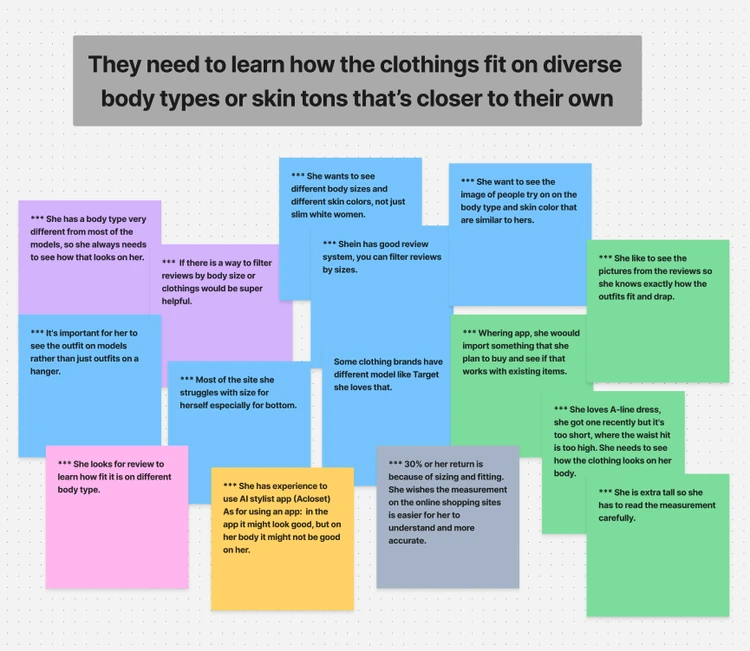
Affinity map was performed to synthesize key insights. This partial view shows how I got the insights. Click the link for the full report and the image to enlarge.

Diverse representation needed

Shoppers struggled to visualize products on themselves due to a lack of representation in their skin tones and body types

Diverse representation needed

Shoppers struggled to visualize products on themselves due to a lack of representation in their skin tones and body types

Diverse representation needed

Shoppers struggled to visualize products on themselves due to a lack of representation in their skin tones and body types

Outfit recommendations needed

Users expressed a need for styling guidance that aligns with specific real-world situations and social occasions

Outfit recommendations needed

Users expressed a need for styling guidance that aligns with specific real-world situations and social occasions

Outfit recommendations needed

Users expressed a need for styling guidance that aligns with specific real-world situations and social occasions


Mid-Fi Wireframes


Mid-Fi Wireframes

Mid-Fi Wireframes

Good onboarding ensures a reliable & pleasant AI stylist experience

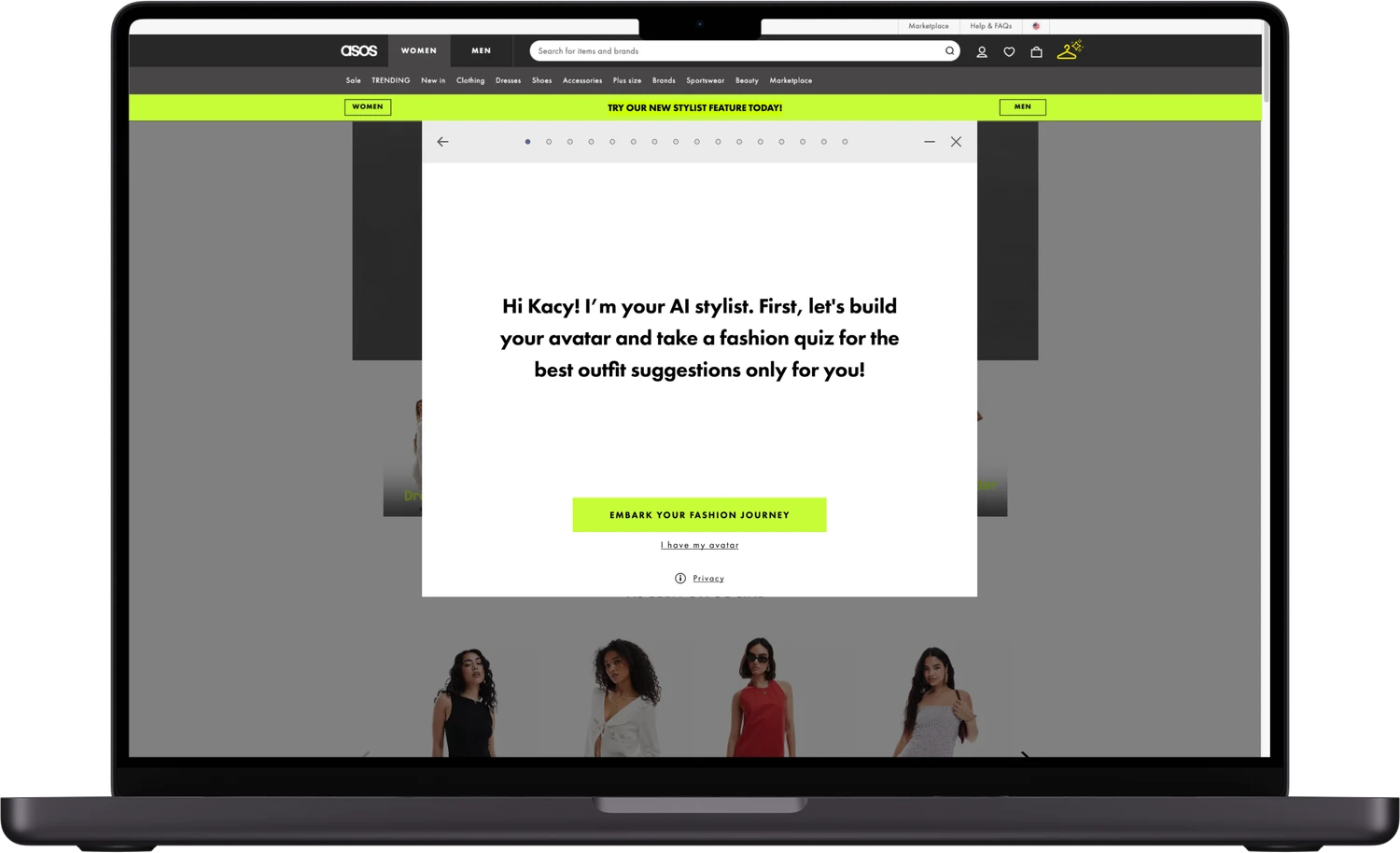
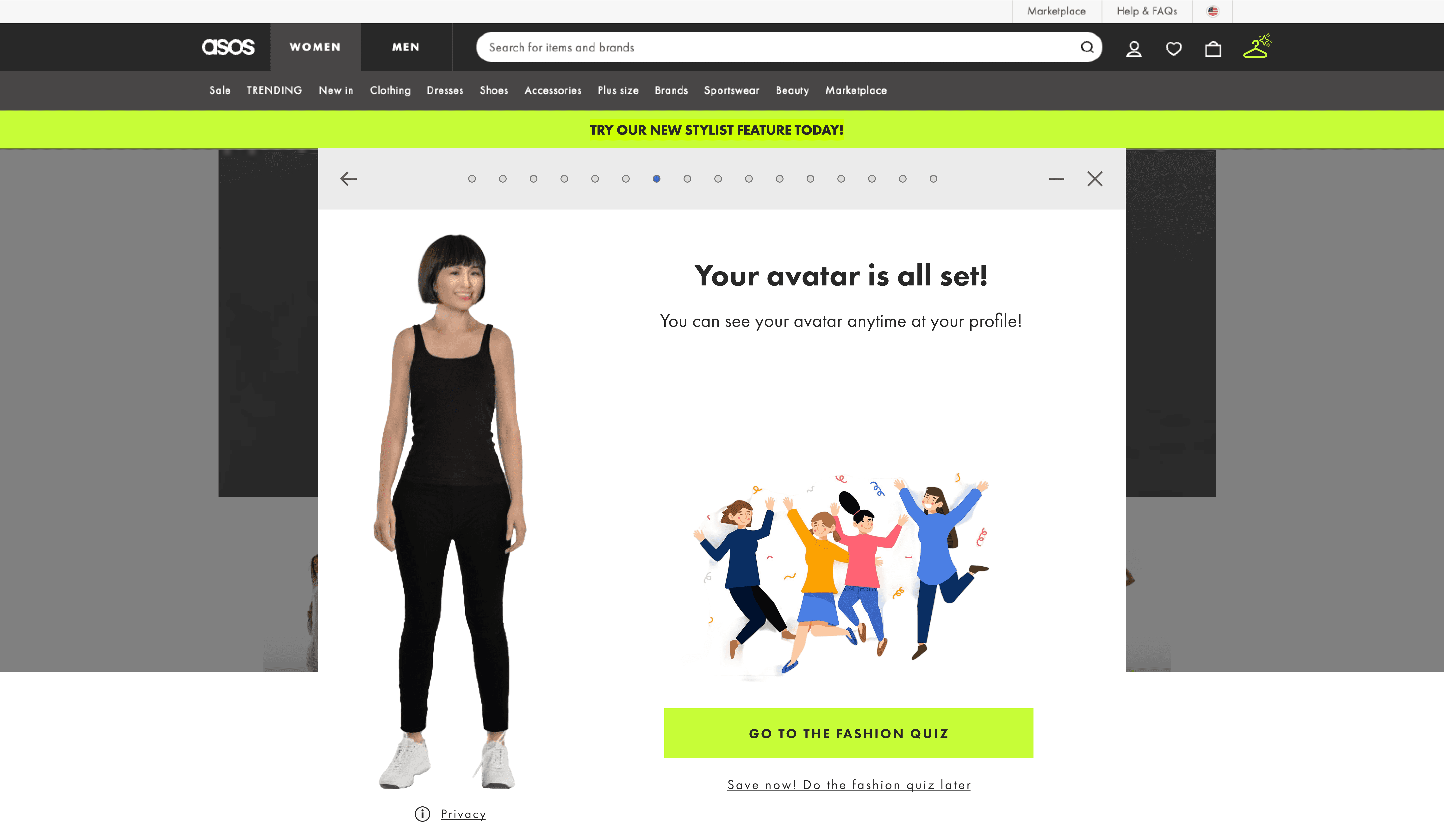
I sketched low- and mid-fidelity wireframes to explore layout options, visual hierarchy, and placement. I also used this opportunity to evaluate whether the feature would work better as a modal or a standalone page within ASOS. Since the function is meant to enhance the traditional product page, I ultimately chose a modal design.

Usability Testing

Shoppers needed a guided and skippable onboarding process

I tested it with users to evaluate the visual and functional experience of the onboarding process and the perceived value of this feature within the website. I conducted moderated usability tests with 5 users.

Task completion time

Speed and efficiency of key user tasks

Task completion time

Speed and efficiency of key user tasks

Task completion time

Speed and efficiency of key user tasks

Feature perceived value

How users perceive the AI Stylist feature

Feature perceived value

How users perceive the AI Stylist feature

Feature perceived value

How users perceive the AI Stylist feature

Pain points

Barriers impacting task completion

Pain points

Barriers impacting task completion

Pain points

Barriers impacting task completion

Overall feedback

Feedback on functionality and visual design

Overall feedback

Feedback on functionality and visual design

Overall feedback

Feedback on functionality and visual design

Test Result

😃

5/5

All 5 users highly valued AI stylist feature

😃

5/5

All 5 users highly valued AI stylist feature

😃

5/5

All 5 users highly valued AI stylist feature

⚠️

5’ 52”

While 1 - 3 minutes is common for smooth experiences, based on NNG

⚠️

5’ 52”

While 1 - 3 minutes is common for smooth experiences, based on NNG

⚠️

5’ 52”

While 1 - 3 minutes is common for smooth experiences, based on NNG

😟

4/5

4/5 users found intent-driven question for body type queries confusing

😟

4/5

4/5 users found intent-driven question for body type queries confusing

😟

4/5

4/5 users found intent-driven question for body type queries confusing

😟

5/5

All 5 users needed a more flexible onboarding process without losing provided information

😟

5/5

All 5 users needed a more flexible onboarding process without losing provided information

😟

5/5

All 5 users needed a more flexible onboarding process without losing provided information


Iteration


teration

A more flexible, guided design improves the AI stylist onboarding experience


  1. Changing from “open-ended questions” to “guided body type questions”

During the usability test, I found that users felt more comfortable with guided questions, as they wanted the avatar to be accurately built. They felt lost with open-ended questions and were unsure how to provide accurate information without guidance.
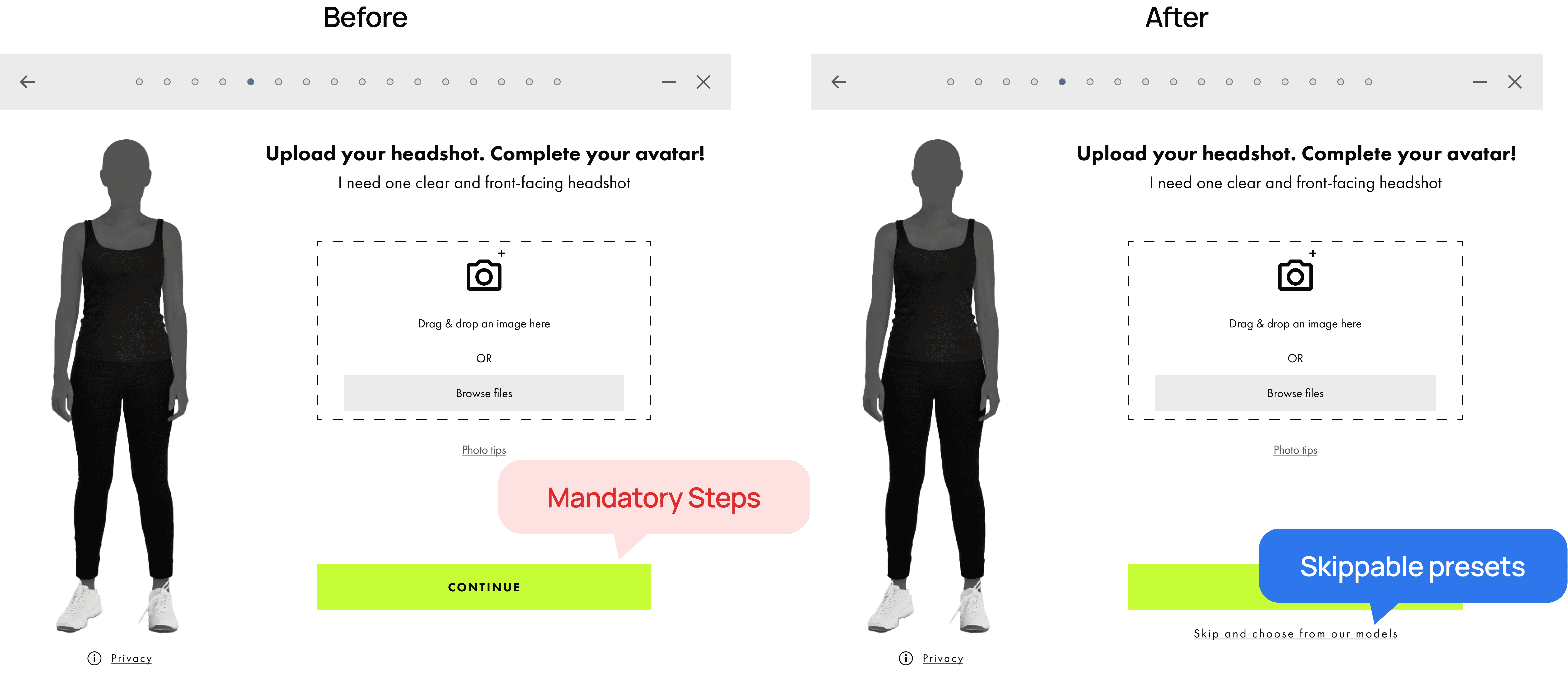
  1. Adding flexible onboarding control

Introducing skippable presets allowed users to bypass repetitive steps, significantly reducing friction.
Usability Testing

Guided steps with skippable presets boosted user satisfaction significantly

I conducted moderated usability sessions using the Rapid Iterative Testing and Evaluation (RITE) method, allowing me to quickly evaluate the iteration results from a smaller group of users (3 participants). To evaluate the improvements, I measured the following:

Task completion time

Measured from the moment a user identifies the AI stylist icon on ASOS homepage to the completion of the onboarding flow

Task completion time

Measured from the moment a user identifies the AI stylist icon on ASOS homepage to the completion of the onboarding flow

Task completion time

Measured from the moment a user identifies the AI stylist icon on ASOS homepage to the completion of the onboarding flow

Satisfaction score

Calculated by asking users to rate how intuitively the feature helps them visualize fit and personalized outfit suggestions

Satisfaction score

Calculated by asking users to rate how intuitively the feature helps them visualize fit and personalized outfit suggestions

Satisfaction score

Calculated by asking users to rate how intuitively the feature helps them visualize fit and personalized outfit suggestions

The average task completion time went from 5'52" to 5'4". While not a significant change in speed, the overall satisfaction score jumped from 7.0 to 9.3. This indicates that even without a dramatic time improvement, the flexibility, built-in datasets, and image-text options greatly improved the quality of the experience.

😃

13.6%

Faster onboarding completion time

😃

13.6%

Faster onboarding completion time

😃

13.6%

Faster onboarding completion time

😃

32.9%

Increase in user satisfaction

😃

32.9%

Increase in user satisfaction

😃

32.9%

Increase in user satisfaction

Final Thoughts

What was accomplished

  1. AI stylist feature design:


I designed an AI Stylist feature for ASOS, enabling personalized avatars for virtual try-on and AI-powered outfit suggestions.


  1. Personalized avatars & smart styling:

This feature was designed to resolve online shoppers’ challenges in matching outfits to their body types, skin tones, unique fashion styles, and occasions.

  1. Balancing intent and guidance:

A seamless onboarding process balances AI intelligent adaptability and user guidance. It offers flexible image options, text-image explanations, auto-saving steps, and manageable tasks while gathering sufficient information.

  1. AI stylist feature design:


I designed an AI Stylist feature for ASOS, enabling personalized avatars for virtual try-on and AI-powered outfit suggestions.


  1. Personalized avatars & smart styling:

This feature was designed to resolve online shoppers’ challenges in matching outfits to their body types, skin tones, unique fashion styles, and occasions.

  1. Balancing intent and guidance:

A seamless onboarding process balances AI intelligent adaptability and user guidance. It offers flexible image options, text-image explanations, auto-saving steps, and manageable tasks while gathering sufficient information.

  1. AI stylist feature design:


I designed an AI Stylist feature for ASOS, enabling personalized avatars for virtual try-on and AI-powered outfit suggestions.


  1. Personalized avatars & smart styling:

This feature was designed to resolve online shoppers’ challenges in matching outfits to their body types, skin tones, unique fashion styles, and occasions.

  1. Balancing intent and guidance:

A seamless onboarding process balances AI intelligent adaptability and user guidance. It offers flexible image options, text-image explanations, auto-saving steps, and manageable tasks while gathering sufficient information.

How I would measure the impact

  1. Return Rate Reduction:

Track changes in product return rates before and after users engage with the AI Stylist to evaluate its effectiveness in improving fit and satisfaction.

  1. User Satisfaction Score:

Collect satisfaction ratings post-stylist usage through in-app prompts or email follow-ups to gauge perceived helpfulness and user experience quality.

  1. Qualitative Feedback Collection:

Use short feedback forms or contextual surveys to capture insights on how well the stylist matched user preferences, and identify areas for refinement.

Reflection

  1. Balancing flexible, conversational, and traditional inputs is key to a pleasant AI experience

Through the ASOS AI stylist project, I learned that users need clear structure and guidance to feel confident in AI-driven experiences. Avoiding standalone open-ended questions, combining multiple-choice with open input, and using text-image questionnaires helped me understand how to balance flexibility with clarity, an approach I would apply more deliberately in future designs.

  1. Recognizing the role of ethics in AI-powered fashion tools

This project highlighted the importance of considering AI ethics alongside functionality, especially in style tech where representation and accuracy matter. I learned that improving avatar accuracy and using features like outfit swapping as feedback loops can help align AI suggestions with user trust, reinforcing my commitment to designing more responsible and transparent AI systems.

  1. Designing features that reduce decision fatigue, not add complexity

By analyzing competitors and user feedback, I learned that successful personalization goes beyond recommendations and into everyday usefulness. Ideas like calendar-based outfit suggestions and closet visualization helped me see how thoughtful integrations can reduce cognitive load, shaping how I approach feature prioritization in future projects.

  1. Understanding when and why to use modals and technical constraints

Working on modal design taught me the importance of considering technical constraints like layering, focus management, and how a modal affects interaction with the underlying page. I learned that modals can be effective, not disruptive, when used intentionally to support critical decisions, guiding me to collaborate more closely with engineers and apply interaction patterns more strategically.

  1. Learning to question existing designs through an accessibility lens

Discovering that ASOS’s primary CTA color did not meet accessibility contrast standards helped me realize that even well-known products can contain accessibility issues, and that poor design choices are more common than they appear. This reinforced the importance of critically evaluating existing designs and intentionally applying accessibility guidelines to create more inclusive user experiences.